โœ… Live Tool

๐ŸŽž๏ธ GIF Maker

Turn a series of images into a smooth animated GIF โ€” with full frame control, filters, text overlay, and real GIF encoding. Every step happens locally in your browser; no image is ever uploaded to a server.

๐Ÿ“… Last updated: Aug 2026 โฑ๏ธ Read time: 5 min ๐Ÿท๏ธ Category: Media Tools ๐Ÿ”— Open Tool

๐Ÿ–ฅ๏ธ Tool Screenshot

Below is the actual GIF Maker interface on Tools Hub App:
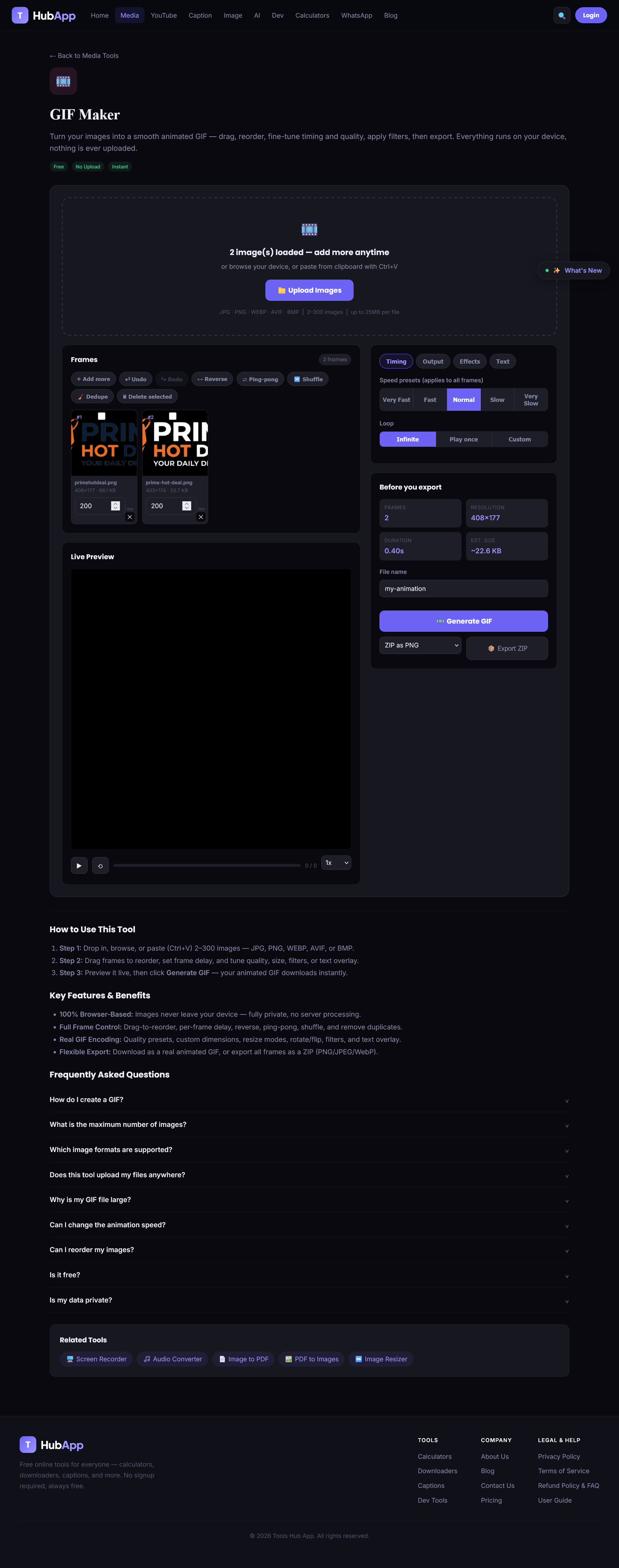
toolshubapp.com/gif-maker/
GIF Maker โ€” Tools Hub App screenshot

โšก Quick Start

1
Add your images
Drop in, browse, or paste (Ctrl+V) 2โ€“300 images โ€” JPG, JPEG, PNG, WEBP, AVIF, or BMP, up to 25MB per file.
2
Arrange & edit your frames
Drag frames to reorder, set per-frame delay, and adjust quality, size, filters, or text overlay from the side panel tabs (Timing / Output / Effects / Text).
3
Preview, then export
Watch the live preview, then click Generate GIF โ€” your animated GIF downloads instantly with a progress bar.

๐Ÿ“ฅ Upload & Import

๐Ÿ–ฑ๏ธ Drag & Drop / Browse / Paste
Add images by dragging them onto the tool, clicking "Upload Images," or pasting directly with Ctrl+V.
๐Ÿ—‚๏ธ Multi-Format Support
Accepts JPG, JPEG, PNG, WEBP, AVIF, and BMP files.
โœ… Smart Validation
2โ€“300 images per project, 25MB per-file limit, with a clear warning if a file is skipped.
โš™๏ธ Automatic Optimization
Large images are auto-downscaled before processing, keeping things fast even on high-resolution photos.

๐ŸŽž๏ธ Frame Management

โ†”๏ธ Drag-to-Reorder
Rearrange the animation sequence by dragging any frame card to a new position.
๐Ÿ—‘๏ธ Multi-Select & Bulk Delete
Select multiple frames with checkboxes and remove them all at once.
โฑ๏ธ Per-Frame Delay
Set a custom display duration (20msโ€“5000ms) for each individual frame.
๐Ÿš€ Global Speed Presets
Apply a delay to every frame at once โ€” Very Fast, Fast, Normal, Slow, or Very Slow.
โ†ฉ๏ธ Reverse
Flip the entire frame order with a single click.
๐Ÿ“ Ping-Pong
Auto-mirrors the sequence forward-then-backward (1-2-3-2-1) for a seamless loop.
๐Ÿ”€ Shuffle
Randomizes frame order for creative or testing purposes.
๐Ÿงน Remove Duplicates
Automatically detects and removes visually identical frames to reduce file size.
๐Ÿ’ก Tip: Every structural change โ€” reorder, delete, reverse, shuffle, dedupe โ€” can be undone or redone, including with Ctrl+Z / Ctrl+Y.

๐ŸŽจ Visual Editing

๐Ÿ”„ Rotate & Flip
Rotate the entire animation 90ยฐ at a time, or flip it horizontally/vertically.
๐ŸŒˆ Filters
Grayscale, Sepia, or Invert presets, or fine-tune Brightness, Contrast, Saturation, and Blur individually.
๐ŸŽจ Background Color
Fill transparent areas with white, black, or a custom color โ€” or keep them transparent.
โœ๏ธ Text Overlay
Add a caption on top of every frame โ€” control position (top/center/bottom), font size, color, and opacity.

โš™๏ธ Output Settings

๐Ÿ† Quality Presets
Low, Medium, High, or Ultra โ€” balancing color depth and compression automatically.
๐Ÿ“ Dimension Presets
Original, Square, Landscape, Portrait, or a fully custom width/height.
๐Ÿ–ผ๏ธ Resize Modes
Fit images using Contain, Cover, or Stretch behavior.
๐Ÿ” Loop Control
Loop infinitely, play once, or repeat a custom number of times.

โ–ถ๏ธ Preview & Export

Live Playback Preview: watch an accurate real-time preview of the final animation before exporting โ€” complete with Play/Pause, Restart, a progress bar, frame counter, and adjustable playback speed (0.5xโ€“2x).

Real GIF Encoding: generates an authentic, fully-encoded animated GIF (not a static image), with a live progress bar and the ability to cancel mid-render.

Export Summary: before exporting, view total frame count, output resolution, animation duration, and estimated file size.

ZIP Export: download every individual frame as a ZIP archive in PNG, JPEG, or WebP format instead of a GIF.

Custom Filename: name your download before exporting.

๐Ÿ”’ Trust & Privacy

100% Client-Side Processing: no images, frames, or generated GIFs are ever uploaded to a server โ€” everything is created and rendered directly in your browser. Your images stay on your device the entire time.

โ“ Frequently Asked Questions

How do I create a GIF?

Upload 2โ€“300 images, arrange and edit your frames, then click Generate GIF. Your animated file downloads automatically.

What is the maximum number of images?

You can add up to 300 images per project, with a minimum of 2 and a 25MB limit per file.

Which image formats are supported?

JPG, JPEG, PNG, WEBP, AVIF, and BMP.

Does this tool upload my files anywhere?

No. All processing โ€” decoding, editing, and encoding โ€” happens locally in your browser. Nothing is ever sent to a server.

Why is my GIF file large?

File size depends mainly on frame count, dimensions, and quality setting. Try a lower quality preset, fewer/smaller frames, or the "Remove duplicate frames" tool.

Can I change the animation speed?

Yes โ€” use a global speed preset for all frames, or set a custom delay (20msโ€“5000ms) per individual frame.

Can I reorder my images?

Yes, simply drag any frame card to a new position in the grid.

Is it free?

Yes, the tool is completely free with no signup required.

Is my data private?

Yes โ€” since everything runs client-side, your images never leave your device.

๐Ÿ†• Coming soon: an interactive crop/zoom/pan editor, image watermarking, frame transition effects, WebP/APNG animation export, and auto-saved recent projects.

๐ŸŽž๏ธ Ready to make your GIF?

Free, private, instant โ€” full frame control, filters, and real GIF encoding, all in your browser.

Try GIF Maker โ†’